This website uses cookies to enhance user navigation and to collect statistical data. For more information please click on the following our cookie policy. By continuing to browse on this website, you accept the use of cookies for the above purposes.
We're sorry, we are unable to log you in because you have cookies disabled. Please enable cookies in your browser, and try to log in again. For assistance, please contact support. For more information about browser cookies, click here.
Please reset your password to continue, an email has been sent to . Please follow the link in this email to reset your password.
Upgrade To GoldWatch And Chat In Full Screen With CAM4 Theater ModeWatch Multiple Cams At Once!Send PMs To Broadcasters To Chat In PrivacyChat Without Borders With Automatic Translation Enjoy CAM4 Totally Ad-FreeSave More Of What You LikeCustomize Your ChatPreview Other Cams With Peek!Add A Password For Total PrivacyChat Live With Real Porn Stars!Chat Without Message Limits!Watch The Exclusive Daily Gold ShowWatch And Tip In SecrecyChat Without Message Limits!
This Feature Is A Gold Exclusive
Gold CAM4 includes over 20 enhanced features that change the way you watch, chat and broadcast.Gold CAM4 includes Theater Mode and 20+ more features that change the way you watch, chat and broadcast.Gold CAM4 includes Multicam and 20+ more features that change the way you watch, chat and broadcast.Gold CAM4 includes Private Messaging and 20+ more features that change the way you watch, chat and broadcast.Gold CAM4 includes Chat Translation and 20+ more features that change the way you watch, chat and broadcast.Gold CAM4 includes No Ads and 20+ more features that change the way you watch, chat and broadcast.Gold CAM4 includes Unlimited Favorite Filters and 20+ more features that change the way you watch, chat and broadcast.Gold CAM4 includes Chat Filters and 20+ more features that change the way you watch, chat and broadcast.Gold CAM4 includes Peek! and 20+ more features that change the way you watch, chat and broadcast.Gold CAM4 includes Private Cam Mode and 20+ more features that change the way you watch, chat and broadcast.Gold CAM4 includes Super Show Chat and 20+ more features that change the way you watch, chat and broadcast.Gold CAM4 includes Unlimited Chat and 20+ more features that change the way you watch, chat and broadcast.Gold CAM4 includes Gold Show Access and 20+ more features that change the way you watch, chat and broadcast.Gold CAM4 includes Stealth Mode and 20+ more features that change the way you watch, chat and broadcast.Your active conversations limit has been reached (2 conversations in last 24 hours). Please upgrade to CAM4 Gold for unlimited conversations.
Chat Without Message Limits!
Support CAM4 today. Upgrade to Gold and get access to these amazing features:
Unlimited Private MessagingSend PMs to your favorite broadcasters to keep your conversations just between the two of you.
100% Ad-FreeEnjoy CAM4 without any distracting ads on the site – including video ads on cams!
Anonymous Tipping & ChatWant some more privacy on CAM4? Enable this to watch, tip and chat without your username visible.
Special Chat StatusStand out from the crowd in chat with a Gold icon and color.
Automated Chat TranslationsChat easily with broadcasters from around the world – the entire chat is instantly translated for you.
Free Gold GiftSend your Gold Gift to your favorite performer once a month to show your dedication.
Free Monthly BoostHelp your favorite broadcaster by boosting them higher in the directory for free!
Oops! This email address is already in use on CAM4.
Please use a different email to receive your tokens:
Or transfer your tokens to your existing CAM4 account:
How do I change my view or filter broadcasts on CAM4?
You can customize your viewing experience on CAM4 in two ways:
Method 1: Quick Sort Options
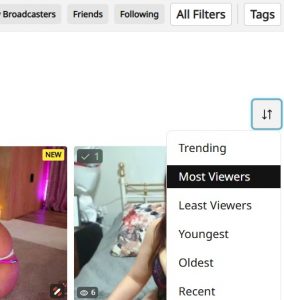
Use the sort and filter controls located in the top right of the page. These provide preset sorting options to quickly change your view:
Most Viewers
Newest Broadcasters
Highest Rated
And more filtering options
Method 2: Custom Filters
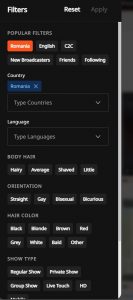
Additional filter options are available in the top right area where you can select your own preferences to create a customized browsing experience by clicking on the "All Filters" button. The filters will appear on the left-hand side:

 Login
Login